
GT99 Deposit & Withdrawal Guide for Bangladesh Players
GT99 account, many users get a little stuck when depositing or withdrawing money for the first time — where to click, what information to provide, and how long it will take. This is normal. These questions come up when making a transaction on any new platform for the first time. This guide explains every deposit and withdrawal step in simple language. Whether you are new or experienced, following these steps will make transactions easier.
How to Deposit on GT99
Follow the steps below to deposit money into your account:
🧶 Step 1: Log in to Your Account
If you do not have an account yet, register first. After logging in, select the “Deposit” option.
🧶 Step 2: Choose a Deposit Method
GT99 offers many payment methods, including bank transfer and e-wallets. Choose your preferred method and select the deposit channel.
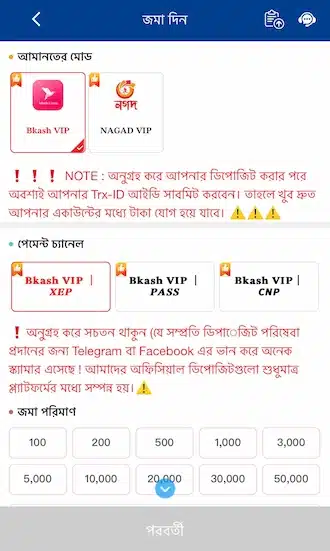
🧶 Step 3: Fill in the Required Information
Enter the deposit amount (minimum 100 — maximum 50,000 BDT). If there is any deposit promotion, select it as well.
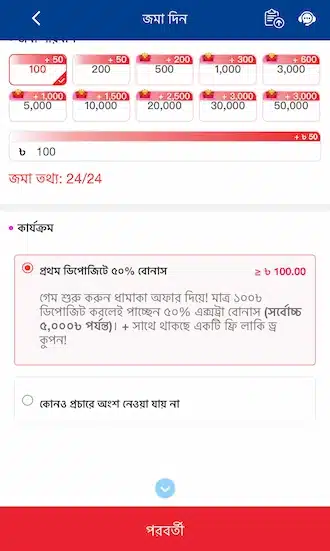
🧶 Step 4: Confirm the Transaction
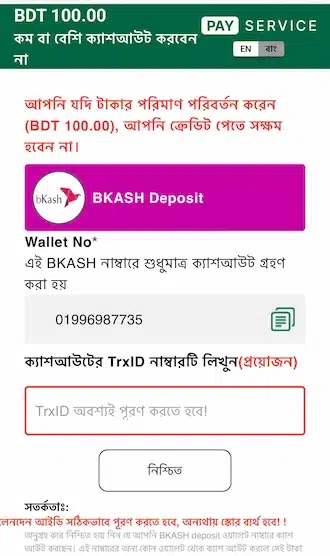
After filling in the information, confirm the transaction. The deposit will be completed.
💡 Tip: If there is a problem during deposit, check your internet connection and account information once.
GT99 Withdrawal Guide for Beginners
Every step from login to receiving money in your account is explained below. Keep your login information accurate and check the withdrawal rules from time to time.
🧩 Step 1: Log in to your betting account. Then go to the “Withdraw” section from account management.
🧩 Step 2: On the withdrawal page, click the plus icon and add the withdrawal account information.
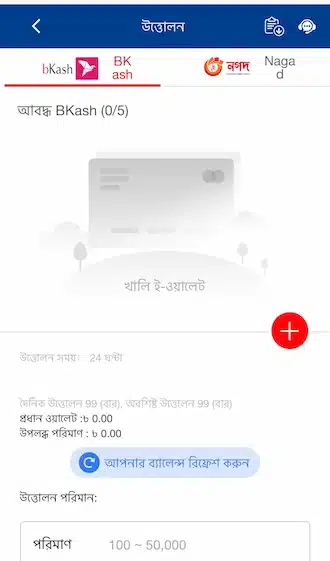
🧩 Step 3: Enter the account holder name and bank account number.
🧩 Step 4: Create a withdrawal password to protect the balance. The password should be made of 6 random digits.
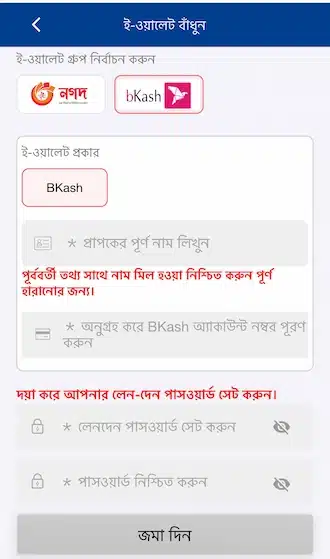
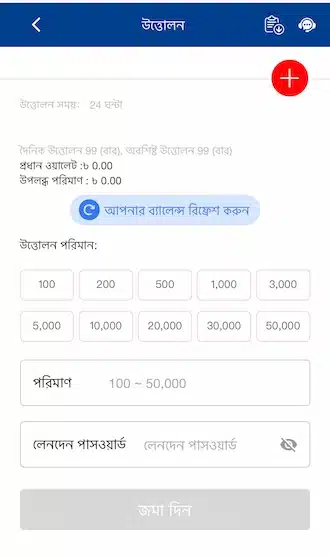
🧩 Step 5: Return to the withdrawal page. Click the withdrawal option from the main wallet.
🧩 Step 6: Enter the withdrawal amount (200–50,000 BDT) and the withdrawal password. Then submit the request. Wait for the money to arrive in your bank account.
Things to Keep in Mind During Withdrawal

To avoid unexpected fees, read the withdrawal terms first. Fill in your personal information, bank account number, and balance correctly, and keep your identity verification completed.
Choose the withdrawal method that is most convenient for you. Check the platform regularly for GT99 updates and new rules.
Pay attention to the withdrawal processing time. Do not submit a withdrawal request during system maintenance or when transaction restrictions are in place.
If there is any problem, contact the platform support team. Do not try to solve problems on your own without following the platform guidelines — this may increase risk.